WriteRoom

WriteRoom
License:
Trial version
Language:
English
Developer:
Developer's website
OS:
Mac OS X
Updated:
See detailed info

Softonic review

Nick Mead

“Distraction-free writing environment”

by Nick Mead about WriteRoom

It's hard to even imagine the days when writing was restricted to either a pen and paper or a clunky old typewriter.

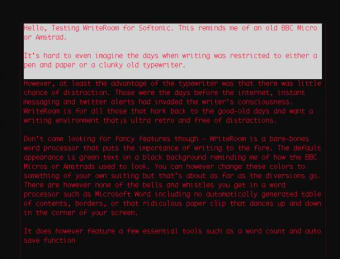
However, at least the advantage of the typewriter was that there was little chance of distraction. Those were the days before the Internet, instant messaging and Twitter alerts had invaded the writer's consciousness. WriteRoom is for all those that hark back to the good old days and want a writing environment that¡s ultra-retro and free of distractions. The program's novel design means that elements such as the Dock, Growler alerts and email pop-ups stay well hidden.

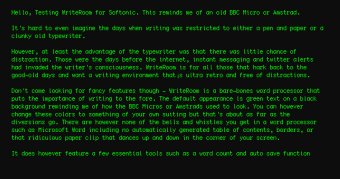
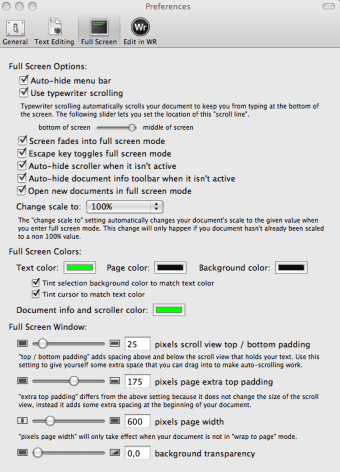
Don't come looking for fancy features though - WriteRoom is a bare-bones word processor that puts the importance of writing to the fore. The default appearance is green text on a black background reminding me of how the BBC Micros or Amstrads used to look. You however change these colors to something of your own liking using an eyedrop tool.

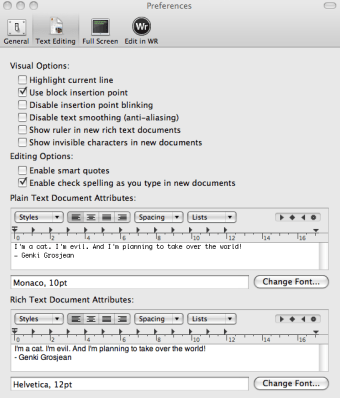
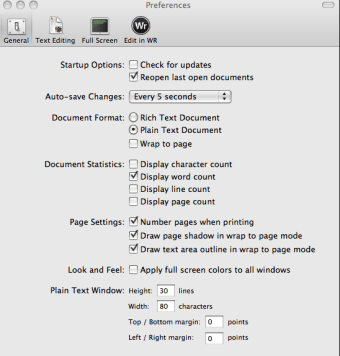
Although WriteRoom claims to be thin on options, there is actually a whole host of different tweaks and adjustments you can make including changing the font, scroll options, scaling, and spell checking. WriteRoom also features a few essential tools such as a word count and auto save function

There are, however, none of the bells and whistles you get in a word processor such as Microsoft Word, including no automatically generated table of contents, borders, or that ridiculous paper clip that dances up and down in the corner of your screen.

If you really find that you can't concentrate on your writing then WriteRoom offers a strangely seductive and peaceful writing environment.

Pros
  • Reduces distractions from the Net
  • Easy to use and get going
  • Calm and clean writing environment
Cons
  • Very few formatting features
  • Not essential - better to turn off any distractions and use an advanced word processor
Download WriteRoom 2.3.7

WriteRoom is virus free

We have analyzed the latest version of WriteRoom with 30 antivirus engines and it is virus free. See analysis results.

TESTED VIRUS FREE - Softonic GUARANTEED

Review and rate WriteRoom

Your avatar

Your opinion is important.
Help other users - be the first to review this program.

Review
  1. Maximum: 75 characters

  2. See example

Pros and Cons
Rate
  1. What rating would you give WriteRoom?

    You need to fill in all fields

    • Usability:

      Not rated
    • Stability:

      Not rated
    • Installation:

      Not rated
    • Functionality:

      Not rated
    • Appearance:

      Not rated
    • Overall rating:

      Not rated
  2. Don't worry, we won't make your email address public.

You're not allowed to share serial numbers, cracks, etc. or link to pages that contain them. If you do, your user account will be deleted, your IP address logged and legal action will be taken.

Get started - just ask a question!

Write a title for your question.

Alternativesto WriteRoom

  • In English:
    Express Invoice
    Express Invoice

    Create professional looking invoices

    Softonic rating:
    • 7/10
    User rating:
    • 3/10
  • Free:
    OpenOffice.org
    OpenOffice.org

    Free open source alternative to Microsoft Office

    Softonic rating:
    • 9/10
    User rating:
    • 6/10
Compare with WriteRoom
Download rank: Office Suites

19 of 20

Softonic rating:
  • Good
  • 7/10
Your rating:
Your rating
  • 0

Review and rate this program

Top Downloads: Office Suites

  • United States
  • Global

  1. Microsoft Word 2011

    Microsoft Word better than ever for Mac

  2. Microsoft Powerpoint 2011
  3. Pages
  4. Microsoft Office 2008
  5. Microsoft Excel 2011

Older versions of WriteRoom

Reviews of WriteRoom in other languages